Smart Dolphin Trading

Ride trend expansion with automated adaptive exits
Capture the most valuable phase of a trend by entering when Wave 4 expansion begins, staying with strong moves while historical data indicates the expansion still has room to continue, and avoiding premature exits through 3 dynamic exit conditions.
Instead of predicting every decision before the trend unfolds, traders can let market conditions guide the entire trade lifecycle – from entry timing to position management and exits.
The core problem
Trend expansion is dynamic. Fixed trading rules aren’t.
The expansion phase doesn’t unfold the same way every time.
Some moves end quickly. Others continue much farther than expected. Even extreme moves can keep expanding before momentum begins to fade.
Yet positions are often managed with fixed rules — a predefined profit target, a trailing stop, or a fixed risk-to-reward ratio.
The real challenge
Simply entering the expansion is not the difficult part. It’s knowing when the advantage remains — and when it begins to disappear.
One phase, one objective
Trend expansion deserves its own strategy
The value of a trend isn’t distributed evenly. The expansion phase is often where momentum, price movement, and statistical opportunity are often strongest.
Rather than applying the same entry and exit rules throughout the entire trend, Smart Dolphin Trading focuses exclusively on managing the expansion phase – from the moment it begins until its advantage starts to fade.
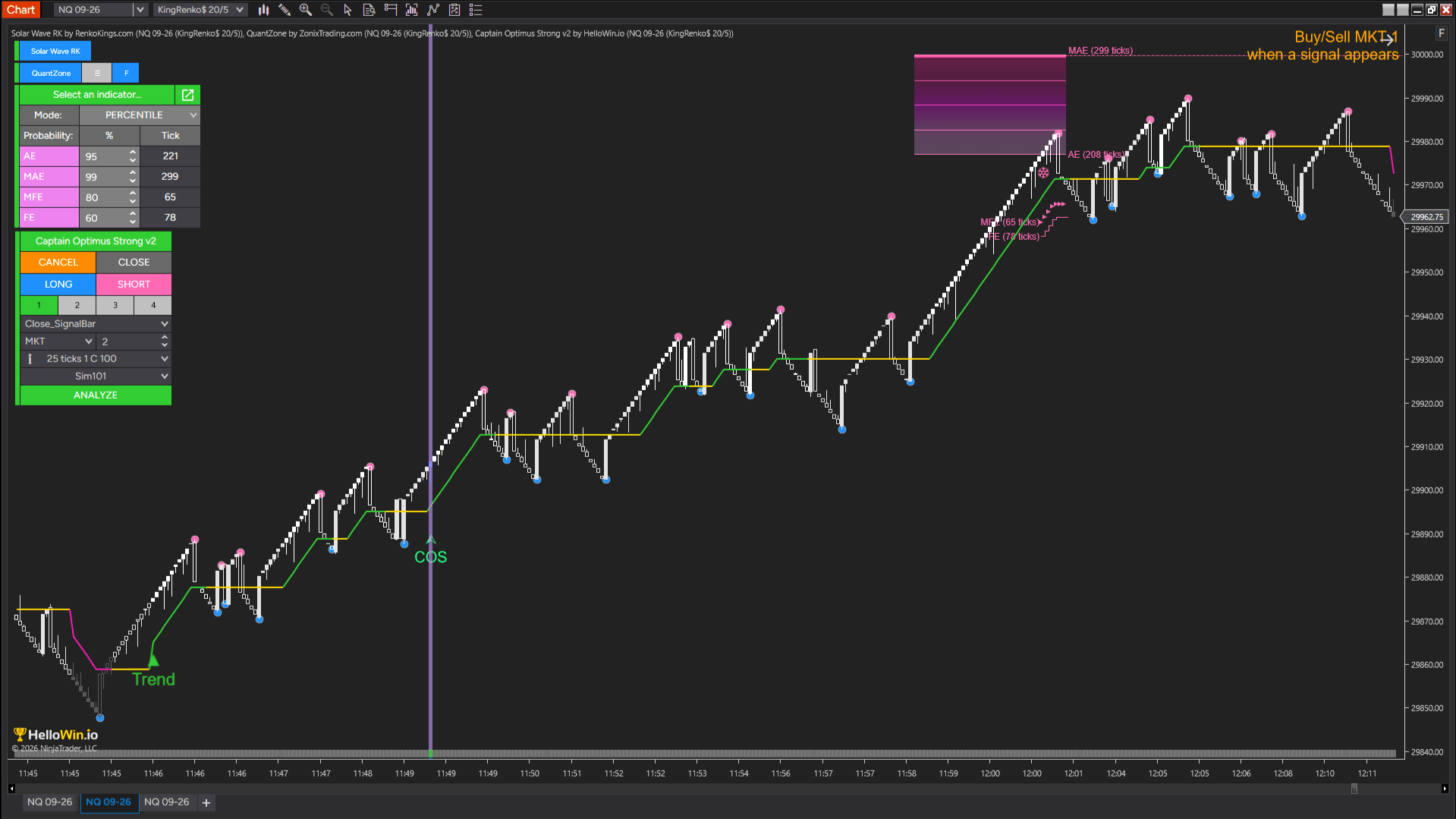
The strategy automatically enters when expansion begins, continues holding while the advantage remains, and exits when signs of reversal appear in statistically extreme zones identified from historical data with reversal probability above 95%.
To support this objective, Smart Dolphin Trading combines 4 specialized trading components into one coordinated workflow.
Together, they guide every stage of the expansion – from recognizing when it begins to managing the position until its statistical advantage begins to fade.
A complete expansion management workflow
Clarify market structure by focusing on meaningful price movement.
Recognize when trend expansion begins.
Automatically execute entries once the expansion phase is confirmed.
Track statistical conditions and identify when the expansion loses its advantage.
Automatically close the position when the expansion phase reaches its end condition.
How the workflow thinks
The logic behind Smart Dolphin Trading
01 — KingRenko$
Clear structure creates better decisions
Price movement contains both meaningful information and short-term fluctuations. When every movement is treated equally, identifying the true development of a trend becomes more difficult.
KingRenko$ focuses on meaningful price movement instead of fixed time intervals, creating a clearer representation of trend structure.
This clearer structure becomes the foundation for recognizing expansion when momentum begins to accelerate.
02 — Solar Wave RK
Recognizing the expansion phase
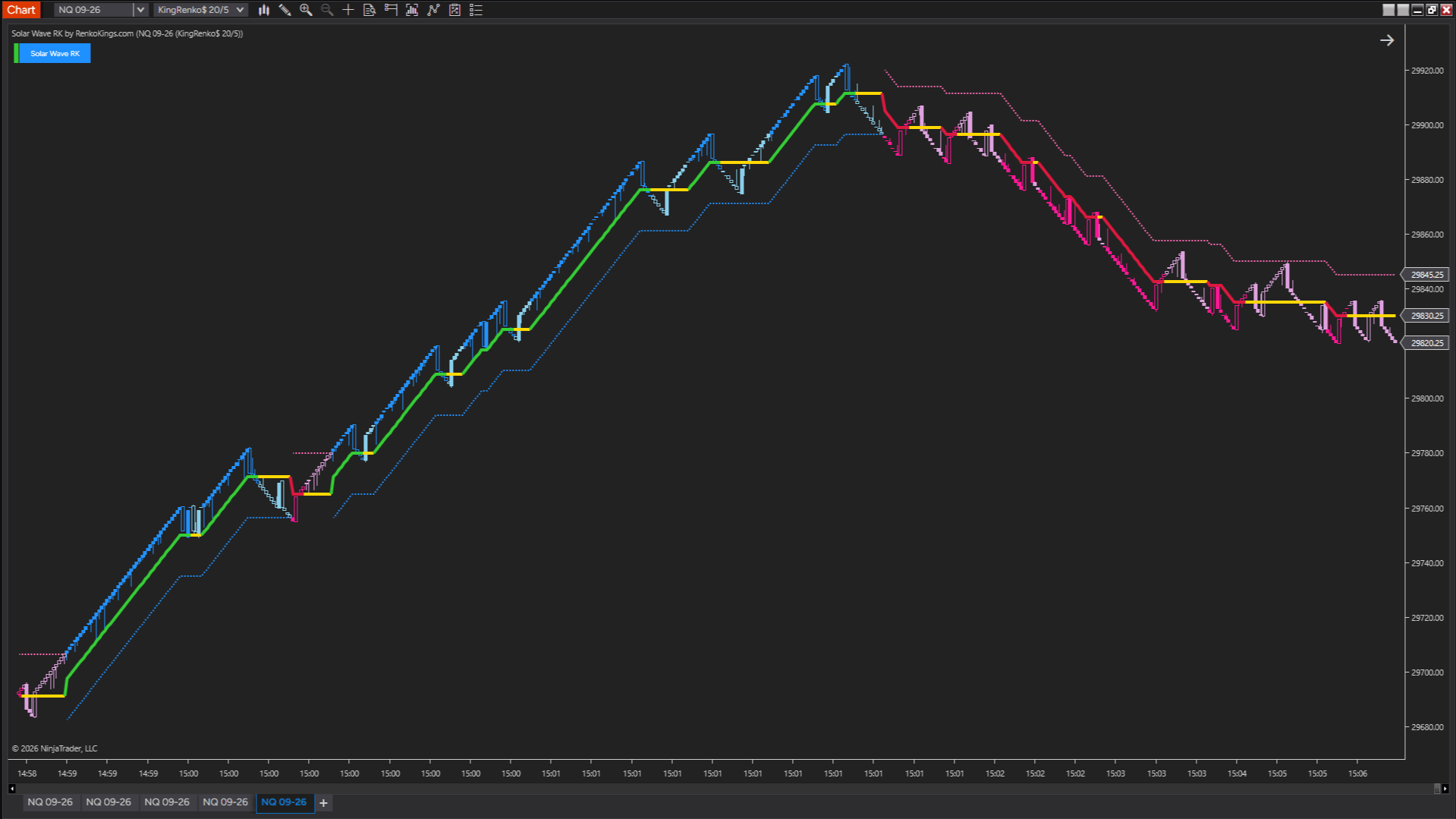
A trend often develops through multiple waves before reaching its strongest expansion.
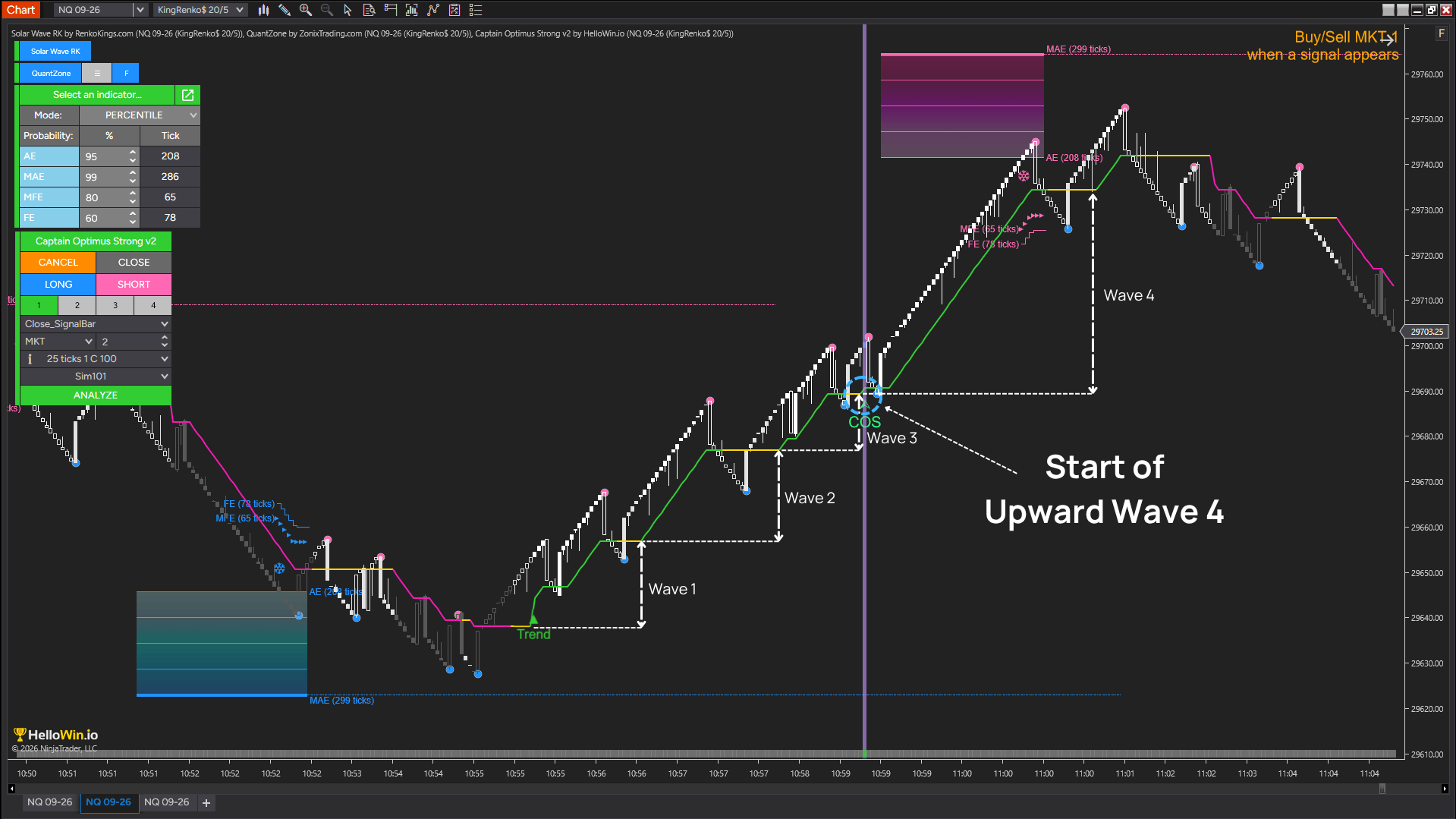
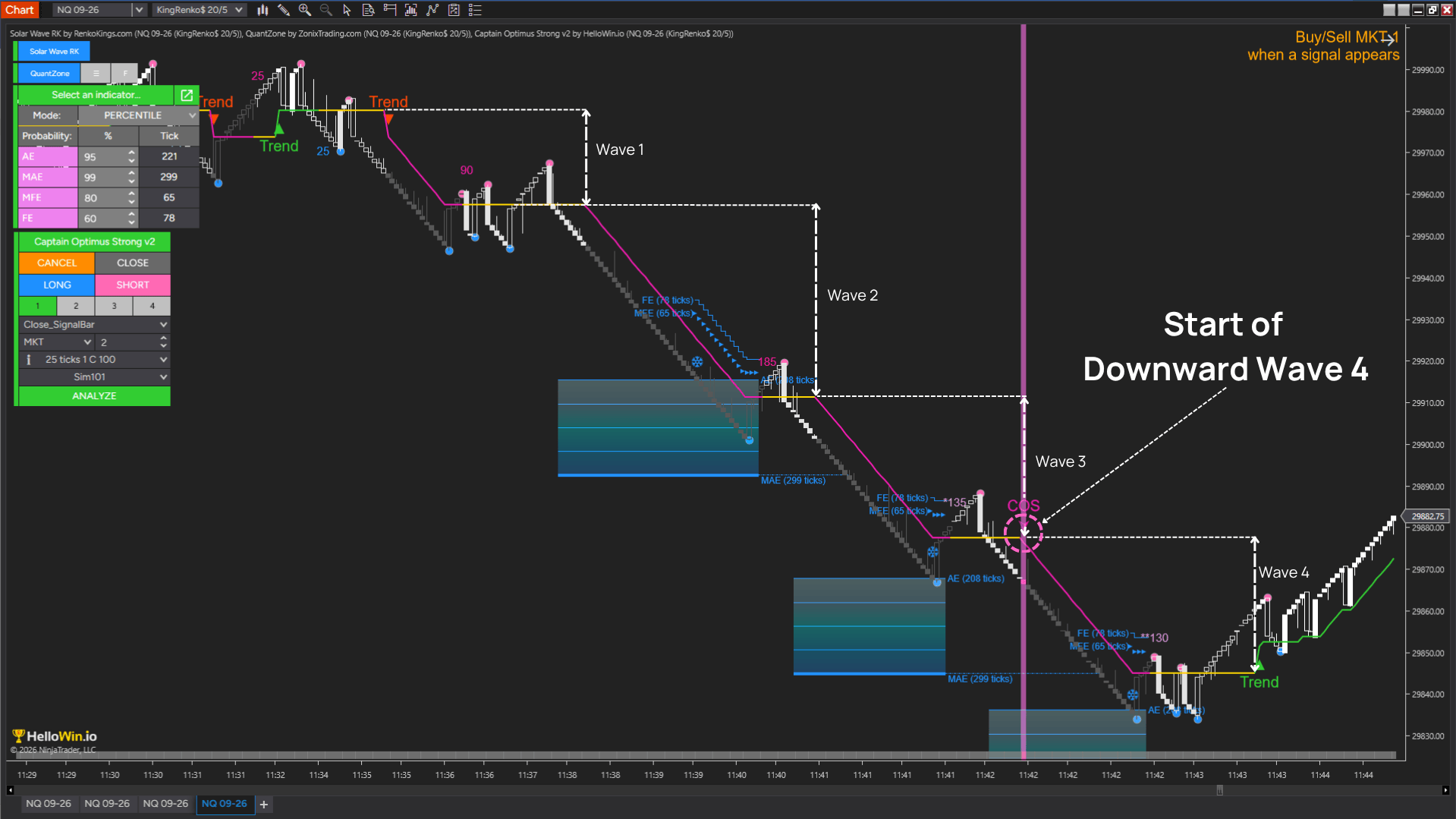
Inspired by the impulsive wave structure of Elliott Wave, Smart Dolphin Trading focuses on the moment when a trend continues into Wave 4 — where the movement may have entered an expansion phase.
Solar Wave RK applies this concept by detecting Wave 4 conditions and generating signals when expansion begins. This helps identify opportunities with greater momentum, wider price movement, and fewer interruptions.
Identifies the sequence of trend waves and displays wave progression through the dedicated Signal_Wave NinjaScript signal.
±1 = Wave 1, ±2 = Wave 2, ±3 = Wave 3, ±4 = Wave 4
03 — Captain Optimus Strong v2
Executing entries without delay
Expansion phases can develop quickly. Even when the right conditions are identified, manual execution can introduce delays, hesitation, or inconsistent decisions.
Captain Optimus Strong v2 monitors signal changes from Solar Wave RK and automatically executes trades when Wave 4 conditions are met.
→ Auto Buy
→ Auto Sell
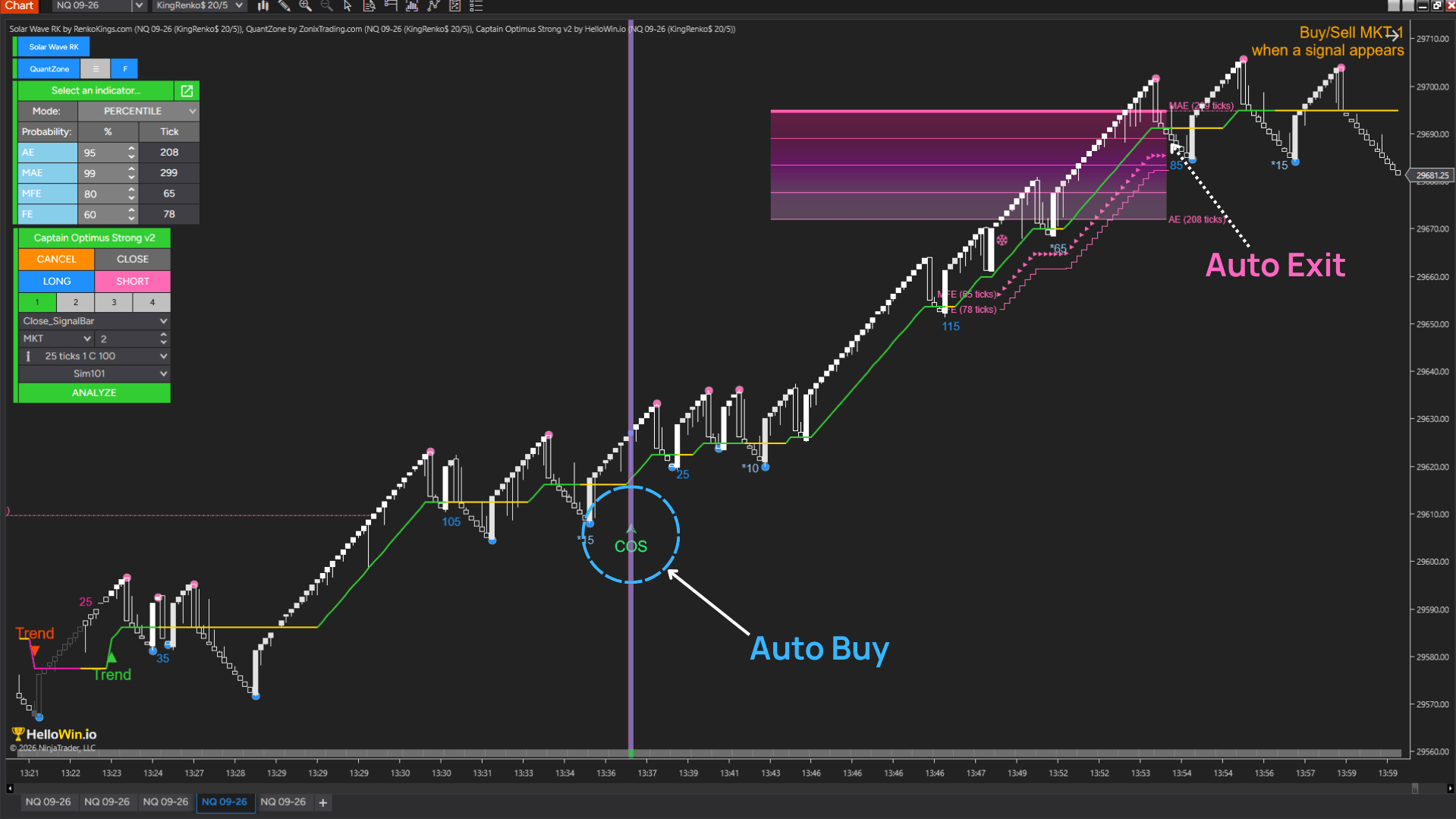
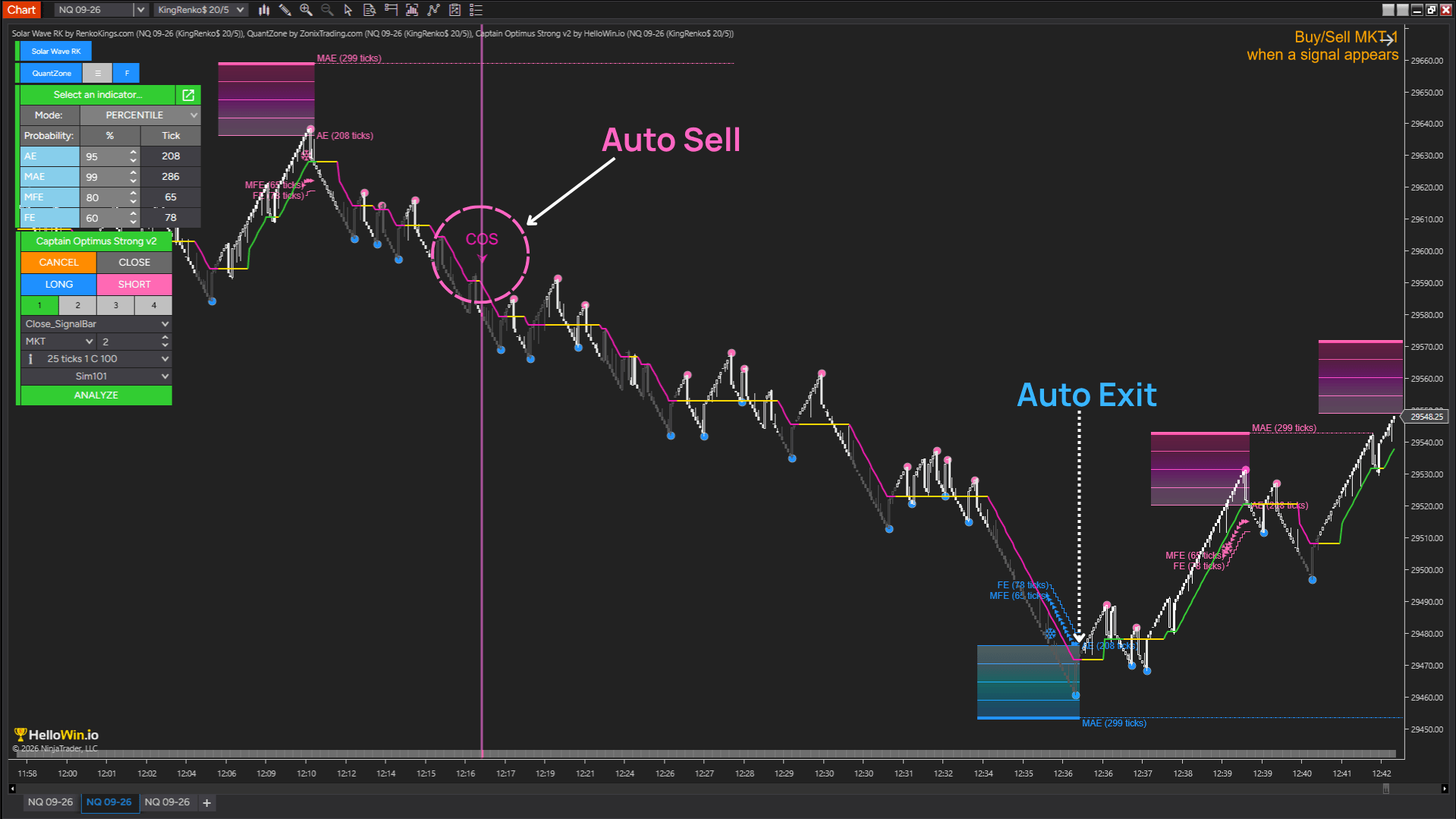
Captain Optimus Strong v2 follows predefined strategy rules consistently, reducing execution delays and emotional interference.
Integrates NinjaScript indicator signals as structured inputs for automated execution.
Combines multiple indicator signals to build confirmation-based trading logic.
04 — QuantZone
Knowing when expansion loses its advantage
After entering a trend expansion, the challenge is knowing when the movement still has room to continue and when its advantage begins to fade.
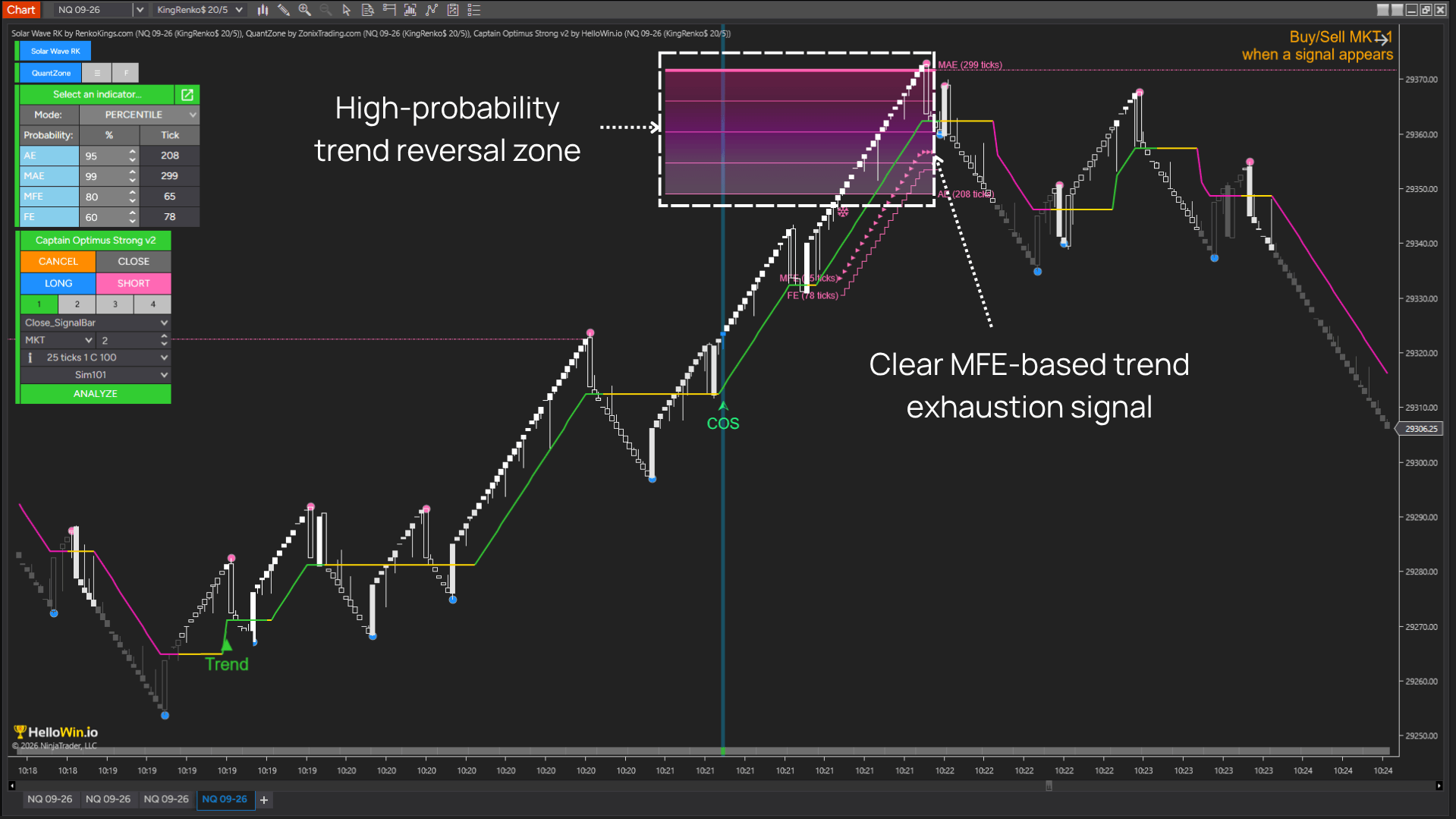
QuantZone uses MFE (Maximum Favorable Excursion) to compare the current expansion with historical price behavior and identify statistically extreme conditions.
When MFE appears, price has entered a zone where historical reversal probability exceeds 95%. However, Smart Dolphin Trading does not exit immediately. The strategy continues monitoring the expansion until the MFE condition ends, allowing strong movements to develop further.
Measures how far winning trades have historically extended after entry, creating a statistical reference for current price expansion.
Tracks the current move against historical MFE behavior, helping identify when the expansion advantage begins to fade instead of relying on fixed profit targets.
05 — Captain Optimus Strong v2
Automatically closing positions when expansion ends
Smart Dolphin Trading adapts its exit decisions to actual market conditions instead of relying on a fixed profit target or trailing stop.
Once QuantZone detects that the expansion advantage has ended, the strategy automatically closes the position to protect accumulated gains.
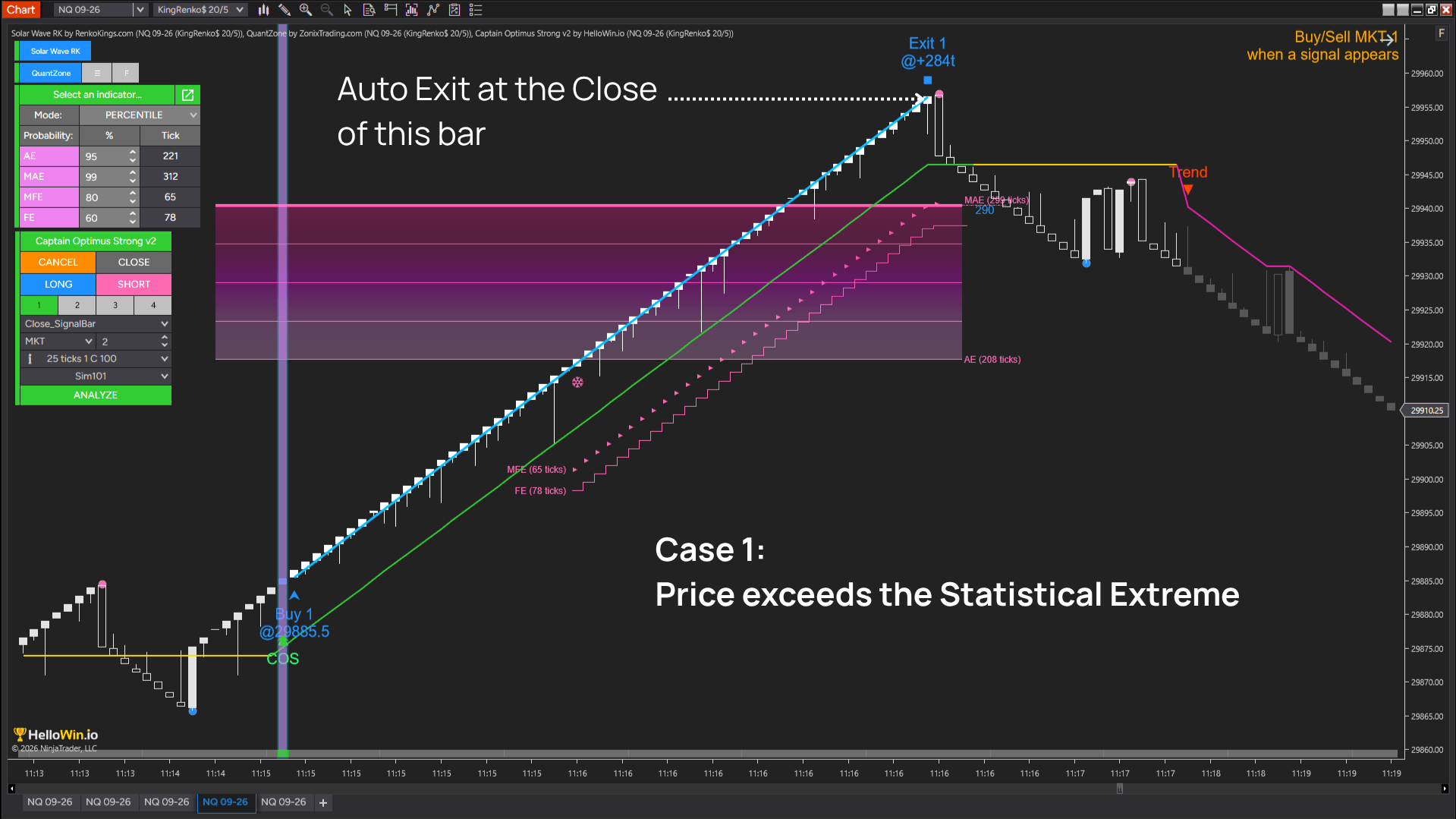
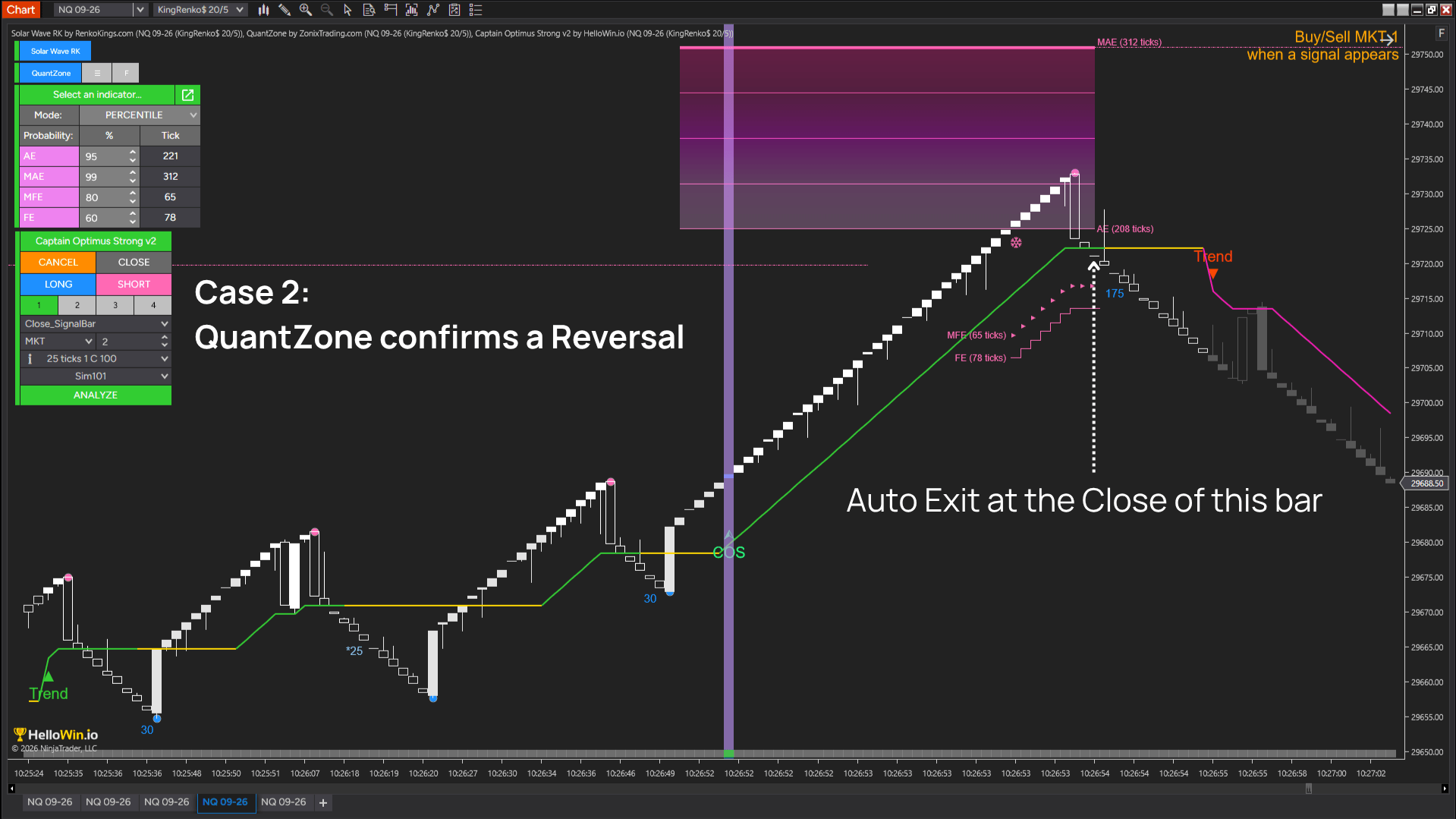
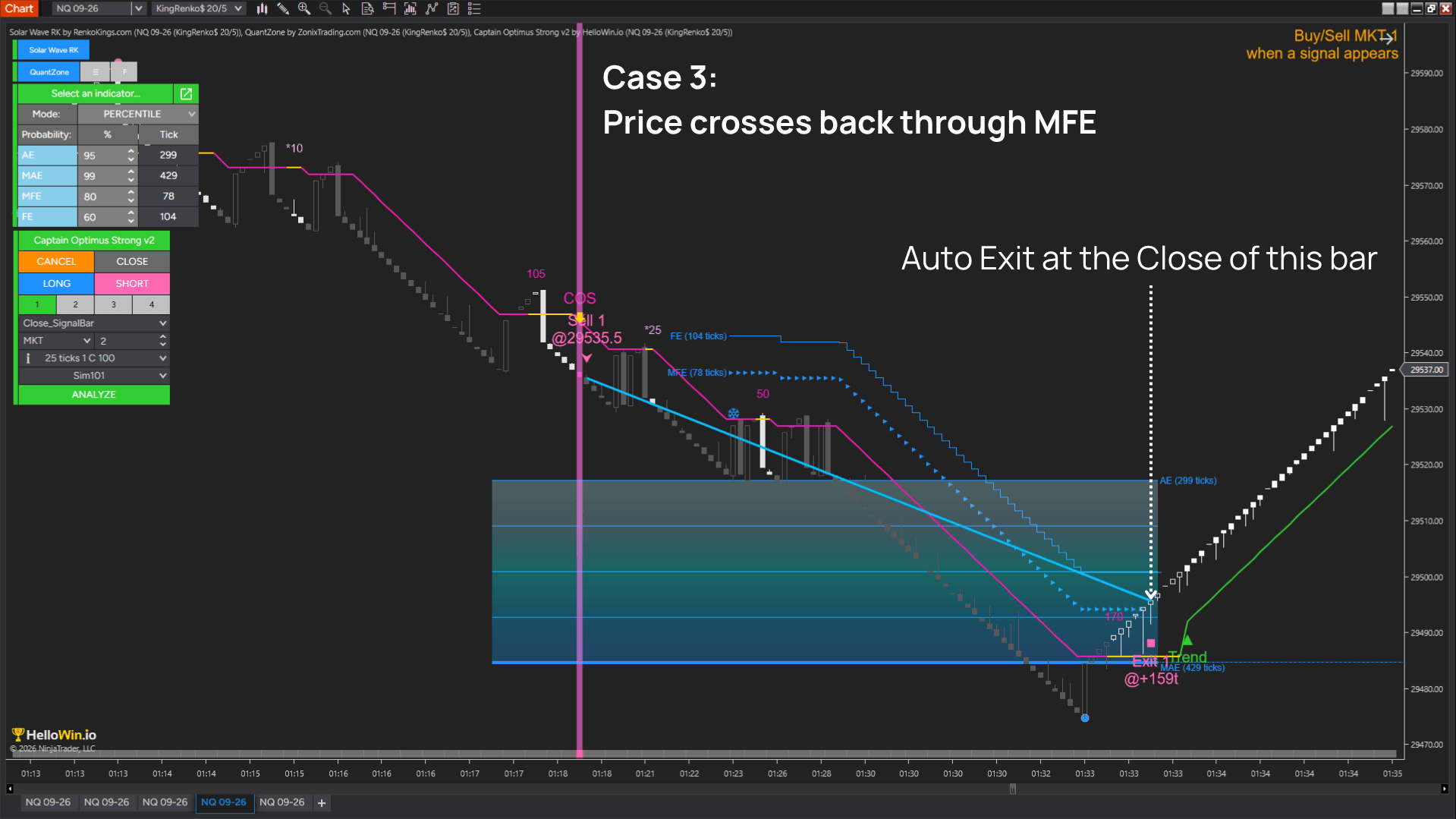
Captain Optimus Strong v2 monitors MFE conditions from QuantZone and automatically closes the position when the MFE condition ends in one of 3 ways:
Price exceeds the statistical extreme zone
Price moves beyond the range defined by historical MFE data, making further expansion increasingly difficult to estimate. The strategy closes the position to protect accumulated gains.
QuantZone detects a shift in market directionl
The current movement changes direction, indicating that momentum may be weakening before a larger reversal develops.
Price crosses back through MFE
After reaching the extreme zone, price reverses through MFE, showing that the expansion advantage is no longer sustained.
The shift
How Smart Dolphin Trading changes the way you trade
Smart Dolphin Trading introduces a different way of managing trends – not by predicting where they will end, but by participating while the statistical advantage remains.
From
Trying to capture every part of a trend.
To
Focusing only on the expansion phase where statistical opportunity is strongest.
From
Entering before the trend has fully developed.
To
Waiting until Wave 4 confirms that trend expansion has begun.
From
Managing trades with fixed profit targets or trailing stops.
To
Managing positions according to changing statistical conditions throughout the expansion.
From
Closing winning trades because a predefined target has been reached.
To
Staying with the move while the statistical edge remains.
From
Guessing when the expansion is losing momentum.
To
Identifying when the expansion advantage begins to disappear through historical MFE analysis.
From
Executing trades manually under time pressure.
To
Executing predefined entry and exit logic automatically and consistently.
From
Managing each trade differently.
To
Following the same objective workflow built on market structure, expansion signals, and statistical probabilities.
In the market
See the expansion workflow operate in live market conditions
Watch how Smart Dolphin Trading converts Wave 4 continuation signals into automated entries, keeps the position active while the statistical expansion remains intact, and closes the trade when QuantZone indicates that the move is beginning to lose its advantage.
Before you decide
Questions? Answered.
Smart Dolphin Trading is not designed to predict every trend or eliminate losing trades. It is designed to turn a specific expansion concept into a transparent, testable, and repeatable workflow.
1. Isn’t this just adding more indicators to my chart?
That’s a fair question. More indicators do not always lead to better trading decisions.
The real question is whether your current setup consistently helps you avoid entering too early, exiting too soon, or giving back accumulated gains when the trend begins to reverse.
Smart Dolphin Trading is not designed to add more signals to your chart. It provides a coordinated workflow for one specific objective: entering the expansion phase, staying with the move while its statistical advantage remains, and exiting when that advantage begins to disappear.
Instead of managing several disconnected indicators manually, the package connects structure, timing, statistical monitoring, and execution in one workflow.
If the package isn’t the right fit for your workflow, you’re covered by our 30-day exchange policy.
2. Does waiting for Wave 4 mean I’m entering too late?
It’s understandable to think that way. Waiting for confirmation can sometimes feel like missing the beginning of the move.
Smart Dolphin Trading is not designed to enter while the trend is still noisy and uncertain. It waits for Wave 4, when the direction is clearer but the expansion may still have room to continue.
The objective is to participate in the body of the trend, where early-stage uncertainty has been reduced while meaningful reward potential may still remain.
In the trade examples shown above, Wave 4 did not mark the end of the move. It appeared after direction had become clearer, while a meaningful part of the expansion still remained.
Our team is here to help with installation and strategy setup, so you can get started with confidence. Contact us anytime you need assistance.
3. Will this strategy work across different markets?
That’s an important question because no strategy should be assumed to perform the same way in every market or under every configuration.
Smart Dolphin Trading provides a clear framework that you can evaluate on the specific instrument, trading timeframe, and settings you intend to use. Rather than claiming universal performance, it allows you to test whether the strategy fits the actual behavior of your market.
Using NinjaTrader’s backtesting tools, you can review historical trades, assess performance under different conditions, and adjust the setup before applying it to live trading.
You won’t be left to figure everything out on your own. Each component includes a detailed manual covering setup, key adjustments, and the trading logic behind it, so you can test and adapt the strategy with confidence.
4. Does a 95% reversal probability mean price will definitely reverse?
No. A high probability is not a guarantee, and price may continue expanding even after entering a statistically extreme zone.
The 95% figure is calculated from a large historical sample, which may include thousands of comparable price movements. It identifies a zone where reversal has occurred frequently under similar conditions, rather than predicting the exact turning point
That is why Smart Dolphin Trading does not exit as soon as price enters the zone. It continues monitoring the move and only closes the position when the statistical extreme is accompanied by additional evidence that the expansion is ending.
If the strategy does not provide a more effective approach to exit timing for your workflow, you’re covered by our 30-day exchange policy.
Access
Choose the level of access that fits your current setup
Access the complete Smart Dolphin Trading workflow or build the package around the indicators you already own.
Complete workflow
Complete Smart Dolphin Trading package
Today’s supported access price
Special bundle access price: $1,200
A complete trend-expansion workflow covering market structure, entry detection, statistical exit management, and automated execution.
- Solar Wave RK lifetime license
- QuantZone lifetime license
- KingRenko$ lifetime license
- Captain Optimus Strong v2 lifetime license
- Personalized support
- Trader manual and strategy templates
Core Smart Dolphin indicator package
Today’s supported access price
Special bundle access price: $650
Build the analytical foundation of Smart Dolphin Trading with the indicators responsible for structure, expansion detection, and statistical trade management.
- Solar Wave RK lifetime license
- QuantZone lifetime license
- KingRenko$ lifetime license
- Personalized support
- Trader manual and strategy templates
Already own part of the workflow?
You do not need to purchase the complete package again. Add only the component required to complete or extend your Smart Dolphin Trading setup.
Solar Wave RK
Today’s supported access price
Detects Wave 4/-4 continuation conditions that may indicate the beginning of a stronger trend-expansion phase.
- Solar Wave RK lifetime license
- Personalized support
QuantZone
Today’s supported access price
Tracks statistically extreme market conditions and provides the MFE-based state used to manage Smart Dolphin Trading exits.
- QuantZone lifetime license
- Personalized support
KingRenko$
Today’s supported access price
Clarifies trend structure by focusing on meaningful price movement, creating a stronger foundation for identifying potential expansion.
- KingRenko$ lifetime license
- Personalized support
Captain Optimus Strong v2
Today’s supported access price
Connects the workflow’s entry and exit conditions into an automated strategy for NinjaTrader 8.
- Captain Optimus Strong v2 lifetime license
- Personalized support
Your purchase is covered by Zuture Exchange
Use the indicators in your own market conditions, preferred markets, timeframes, and trading workflow for up to 30 days. If the setup is not the right fit, you may request an exchange for another eligible product under the applicable Zuture Exchange terms.
Ready when you are
The expansion phase won’t wait for a decision
Markets don’t pause while a workflow sits under evaluation. Build your Smart Dolphin Trading setup, run it against your own market conditions, and let the data decide — not the hesitation.